
This week we covered some basic set up and usage of the most popular social media platforms. My post this week will be an overview of what we have covered and what makes each network unique and how one may work better than others for certain uses.
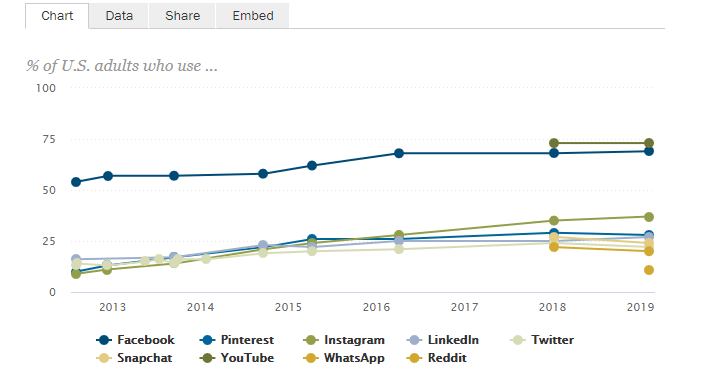
I’ll start with the most well used and known platform; Facebook. According to the Pew Research Centre Facebook has consistently maintained the most active users (over one billion) going back to 2012. The graph below shows the percentages of U.S. adults using various social media sites.
I find Facebook to be the easiest platform to use and see it as the most cohesive platform as it is used for so many things. You start with your personal page where you can share personal or business information with or without graphics.
Some new things I learned this week that I hadn’t known before were some of the options available on my business page. I discovered how to unpublish my page while I work on it. I have a stream of posts where I was updating my cover photo over and over again. Happy to know now how to avoid that in the future.
As well I was introduced to more of the insight features that are available on a Facebook business page. I will definitely be tuning into those stats more often as I create content for my page.
I have also found that recently Facebook has increasingly been advocating the use of groups as a safer way for members to connect. Check out this post for more insight into this trend; How to Create a Facebook Community.
For me Instagram would be second on my list of personal favourites for social media networking. This is a site that is heavily visual. It is a great site where stories are told through a host of styles of pictures. I feel that Instagram is best for those who are trying to sell products either as a business or as an influencer. Sales are made through the effective use of photographs.
I have a side hustle as a Virtual Assistant that I started last Fall. You can find my website here: tracymosby.com
Through this I have been trying to build up my business through increased use of social media networks. One area I have been working on, through Instagram, is my grid. This is the top nine pictures in your feed. A recommendation I read in this week’s content was to add a personal picture every nine frames, so yesterday I added one. You can find my business account here Tracy Mosby Virtual Assistant Services.
Next on the list is Twitter. I have had an account with Twitter since 2012 and I rarely use it. This week’s content indicated that Twitter is primarily used for breaking news, entertainment and sports. One of the most effective features for me on Twitter is the ability to search a topic then select “latest”. This feature then provides the most recent tweets and links on the topic you searched. It is a fabulous platform for staying up to date on anything breaking in the above categories.
This course has us using Twitter frequently and I am enjoying learning and using it to stay current with my classmates for my Social Media Essentials course.
LinkedIn is another platform I have had an account on for quite some time, but again rarely use. This is a great platform for networking with co-workers and acquaintances and is very specifically business-based. You should not use this site as a place to share personal updates.
This week I learned that I should separate my personal page from my business page, another task to add to my ever-growing list of social media updates!
YouTube
YouTube although social, is also a fantastic search engine. I have used it and uploaded a couple of crazy videos in attempt to see if it would be a direction I wanted to take for an online business that I no longer operate. I am nervous and excited to use this platform for our final assignment!

Upon review of my post I see it is quite clear which platform I am the most familiar with and use the most! I look forward to gaining insight from my instructor and classmates on the sites that I do not use as much. Let me know in the comments about your preferred social media sites!
 Tracy Mosby - Social Media Essentials
Hi Tracy,
I really enjoy your blog posts. I must say that you did well in marketing too. You got me reading 2 blog posts in one and enjoyed reading them both. On another note, I found that LinkedIn did not work well for me as I found it heard to gain engagement from previous employers.
All the best.
H
LikeLike
I agree about LinkedIn, since starting my business as a VA and testing out many of the platforms, I find I do not get much engagement from LinkedIn or Twitter, until recently obviously (regarding Twitter). I think moving forward I will focus on Facebook and a bit on Instagram.
LikeLiked by 1 person
Thanks for sharing!
In response to your question, Instagram is my favourite social media platform, because I love the visual aspect of it. One thing I struggle with is having enough “worthy” content – because I want all my photos to be such high quality, and sometimes I do not have enough of those to post! I have found planning ahead is the best solution to this – because you will know ahead of time when you need to get more content ready.
– Zoe Kreutzer
LikeLike
Thanks for leaving a reply Zoe! I find that my daughters age 31 and 28 prefer Instagram as well, whereas my son, age 26 prefers Snapchat.
LikeLike
Wow, Tracy! You’ve got energy and talent based on this blog post and all your other social media accounts (I clicked on your links). This might seem a silly question, but I’m curious where you got your photos for your Virtual Assistant website? I love good graphics. I use https://pixabay.com/ or my own collection for access to good/high quality graphics, but it can be hard to get a series of them that are cohesive like your pretty purple/gold photos.
More related to your post – I appreciated that you pointed out features that were new to you. It helps me – much further behind in the social media field – feel less out of it 😛
LikeLike
Thanks Elisa, that’s so awesome! I purchased a collection of photos from Pixistock for my website. I am considering purchasing a yearly membership, but missed out on the Black Friday sales 😦 so for additional content I am downloading free stock images from other providers I enjoy like Haute Stock and Styled Stock Society.
LikeLike